2022. 1. 5. 22:58ㆍReact Native/Basic
1. react-native init [project_name]
RuntimeError: abort(Error: Failed to install CocoaPods dependencies for iOS project, which is required by this template. Please try again manually: "cd .//Users/byein/rn/rn1/ios && pod install". CocoaPods documentation: https://cocoapods.org/). Build with -s ASSERTIONS=1 for more info. at process.abort (/Users/byein/rn/rn1/node_modules/metro-hermes-compiler/src/emhermesc.js:440:13) at process.emit (node:events:390:28) at emit (node:internal/process/promises:136:22) at processPromiseRejections (node:internal/process/promises:242:25) at processTicksAndRejections (node:internal/process/task_queues:97:32)
->
cd .//Users/byein/rn/rn1/ios && pod install명령어 실행시 오류
...
You may have encountered a bug in the Ruby interpreter or extension libraries.
Bug reports are welcome.
For details:
https://www.ruby-lang.org/bugreport.html
[IMPORTANT]
Don't forget to include the Crash Report log file under
DiagnosticReports directory in bug reports.
zsh: abort pod install
해결방법
brew install cocoapods
2. react-native run-ios

error: can't find the 'node' binary to build the react native bundle. if you have a non-standard node.js installation, select your project in xcode, find 'build phases' - 'bundle react native code and images' and change node_binary to an absolute path to your node executable. you can find it by invoking 'which node' in the terminal.
->
ln -s $(which node) /usr/local/bin/node
명령어 실행 시 오류
ln: /usr/local/bin/node: permission denied
해결 방법
sudo chown -R $(whoami) /usr/local/binln -s $(which node) /usr/local/bin/node
순차적 실행
2. react-native run-android
.....
error: command failed: ./gradlew app:installdebug -preactnativedevserverport=8081
.....
처음엔 버전 17을 사용했으나 충돌로 환경변수 설정을 제대로 한 뒤에도 계속해서 에러 발생.
버전 15로 다시 zulu java 설치 후 환경변수 설정.
이후에도 에러 계속 발생.
환경변수 경로가 제대로 잡혀있지 않았던 것이 원인.
경로를 다시 지정하여 에러 해결.
해결방법
# Java
export JAVA_HOME=/Library/Java/JavaVirtualMachines/zulu-15.jdk/Contents/Home
export PATH=$PATH:$JAVA_HOME/bin

# Android
export ANDROID_HOME=$HOME/Library/Android/sdk
export PATH=$PATH:$ANDROID_HOME/emulator
export PATH=$PATH:$ANDROID_HOME/tools
export PATH=$PATH:$ANDROID_HOME/tools/bin
export PATH=$PATH:$ANDROID_HOME/platform-tools

# nvm
export NVM_DIR="$HOME/.nvm"
[ -s "/opt/homebrew/opt/nvm/nvm.sh" ] && \. "/opt/homebrew/opt/nvm/nvm.sh"  # This loads nvm
[ -s "/opt/homebrew/opt/nvm/etc/bash_completion.d/nvm" ] && \. "/opt/homebrew/opt/nvm/etc/bash_completion.d/nvm"  # This loads nvm bash_completion
3. react-native run-ios 빌드 에러
Command PhaseScriptExecution failed with a nonzero exit code
warning: Capabilities for Signing & Capabilities may not function correctly because its entitlements use a placeholder team ID. To resolve this, select a development team in the rn1 editor. (in target 'rn1' from project 'rn1')
objc[6636]: Class AMSupportURLConnectionDelegate is implemented in both /usr/lib/libamsupport.dylib (0x20ba8f130) and /Library/Apple/System/Library/PrivateFrameworks/MobileDevice.framework/Versions/A/MobileDevice (0x103ebc2c8). One of the two will be used. Which one is undefined.
objc[6636]: Class AMSupportURLSession is implemented in both /usr/lib/libamsupport.dylib (0x20ba8f180) and /Library/Apple/System/Library/PrivateFrameworks/MobileDevice.framework/Versions/A/MobileDevice (0x103ebc318). One of the two will be used. Which one is undefined.
** BUILD FAILED **
The following build commands failed:
PhaseScriptExecution [CP-User]\ Generate\ Specs /Users/byein/Library/Developer/Xcode/DerivedData/rn1-ekakdyqmcadgfmaradkcvwnpfwaz/Build/Intermediates.noindex/Pods.build/Debug-iphonesimulator/FBReactNativeSpec.build/Script-337605CB7CDF90939BEBF863ED22C375.sh (in target 'FBReactNativeSpec' from project 'Pods')
(1 failure)
info Run CLI with --verbose flag for more details.
node_modules, pods, Podfile.lock 도 지워보고 다시 npm install, pod install 도 여러 번 해보고 다양하게 삽질을 했지만 소용없었지만 구글링 끝에 결국 코드 한 줄로 해결했다.
해결방법
nvm unalias default처음 nvm 으로 node를 설치할 때 10.15.1 버전을 설치하면서 default 값으로 10.15.1 버전을 가리키고 있었다. 위 명령어로 default를 해제하자 현재 LTS 버전인 16.13.1 로 실행되면서 빌드에 성공하였다.
4. react-navigation/drawer-navigator 처음 설치 및 실행 시 발생 에러
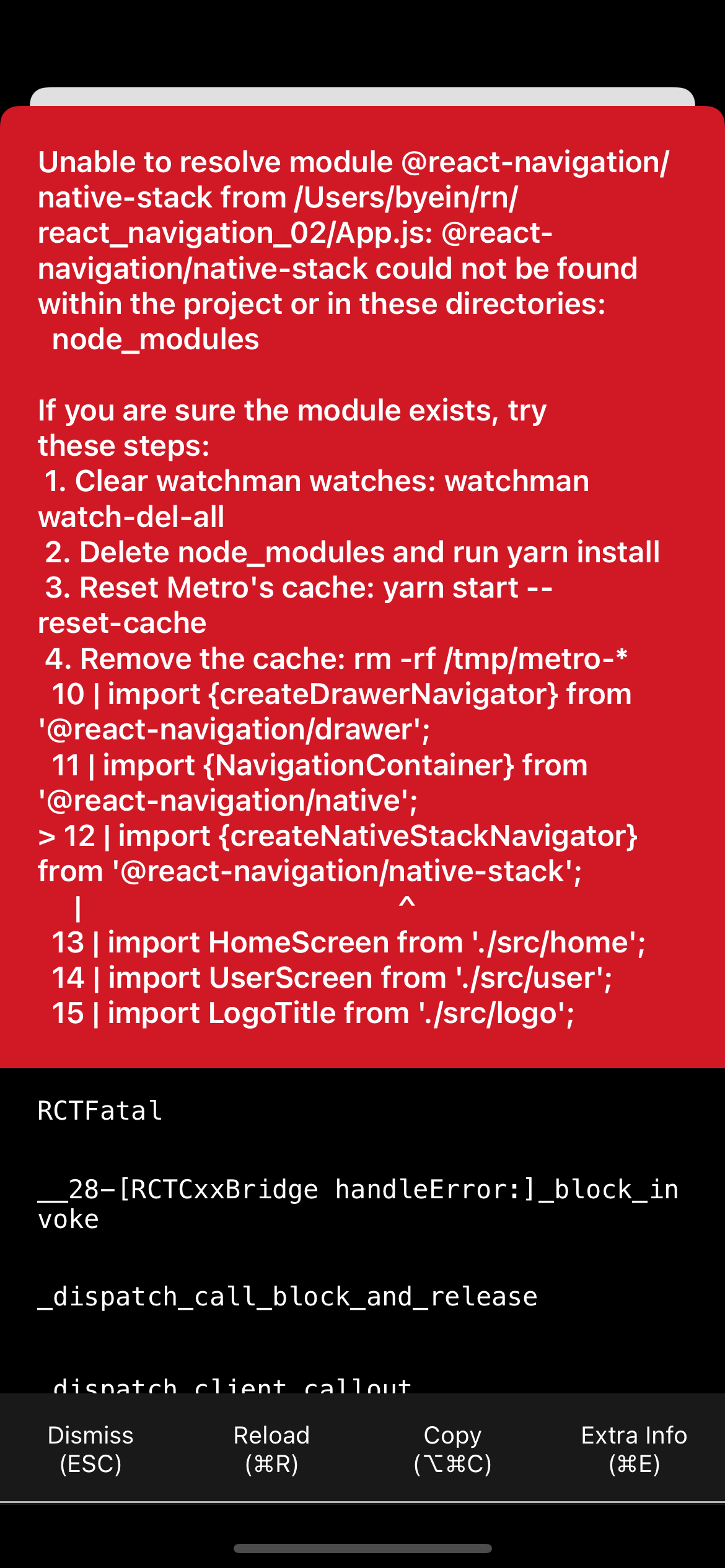
ERROR TypeError: null is not an object (evaluating '_RNGestureHandlerModule.default.createGestureHandler')
unhandled js exception requiring unknown module "53". if you are sure the module exists, try restarting Metro. You may also want to run 'yarn' or 'npm install'.
Unable to resolve module @react-navigation/native-stack from
Undefined is not a constructor
....
위에 보이는 것처럼 Drawer Navigator를 사용하려고 하자 셀 수도 없이 많은 에러들이 발생했다.
해결 방법
1. 공식문서 그대로 설치하기
걷잡을 수 없는 에러에 아예 처음부터 다시 패키지를 만들어서 공식문서를 그대로 따라 설치를 진행했다. 강의에서는 React Navigation ver. 5 를 기준으로 수업을 진행했지만 link 과정이 수반되어 ver.6 에 맞춰서 다시 설치를 진행했다.
아래 링크가 Drawer Navigator의 공식문서이다.
https://reactnavigation.org/docs/drawer-navigator
https://reactnavigation.org/docs/drawer-navigator/
reactnavigation.org
2. npm 이 아닌 yarn 으로 설치하기
react-native-reanimated를 npm으로 설치 시 라이브러리를 사용할 때마다 계속해서 에러를 발생했다. 결국 다시 설치할 때 npm이 아닌 yarn을 사용하여 설치를 진행했다.
npm install @react-navigation/draweryarn add react-native-reanimated@nextnpm install react-native-gesture-handler위의 설치를 끝내고 ios 폴더로 이동하여 아래 명령어를 실행해준다.
pod install그리고 실행 전에 아래 코드를 입력하여 캐시를 지워준 뒤에 실행했다.
killall -9 nodenpm start --reset-cache그랬더니 babel과 관련된 에러가 발생.... 공식문서를 읽어보니 babel 설치에 관한 내용이 나와있다.
https://docs.swmansion.com/react-native-reanimated/docs/fundamentals/installation/
Installation | React Native Reanimated
Reanimated 2 is primarily built in C++ using Turbo Modules infrastructure which is not yet completely deployed in React Native (specifically on Android).
docs.swmansion.com
yarn add react-native-reanimated@next 이 명령어는 이전에 이미 실행했고, babel-plugin을 설치해야한다.
아래 명령어를 통해 설치를 진행!
npm install babel-plugin-root-import --save-dev그리고 babel.config.js 파일로 가서 아래 코드로 바꿔줬다.
module.exports = {
  presets: ['module:metro-react-native-babel-preset'],
  plugins: [
    [
      'babel-plugin-root-import',
      {
        rootPathPrefix: '~',
        rootPathSuffix: 'src',
      },
    ],
    'react-native-reanimated/plugin',
  ],
};
그러고 다시 실행해보니 성공!
5. ERROR Error: Unsupported top level event type "onGestureHandlerStateChange" dispatched
https://github.com/react-navigation/react-navigation/issues/6447#issuecomment-554895755
APP CRASH: Invariant Violation: Unsupported top level event type "onGestureHandlerStateChange" dispatched #286 · Issue #6447 ·
Getting this error on migrating to the latest v4 react-navigation packages. It's happening only in a production build, not a simulator or even a device on a dev build, which makes testing worka...
github.com
해결방법
App.js 뿐만 아니라 index.js 에도 아래 코드 추가!
import 'react-native-gesture-handler';6. ERROR ReferenceError: Can't find variable: Linking
Linking 사용 시 import 를 하지 않아 발생한 오류였다.
해결방법
import {StyleSheet, Text, View, Image, Button, Linking} from 'react-native';
7. Fonts 수정 이후 xcode build error
Fonts에 중복된 값이 들어가 발생한 문제로 xcode에서 프로젝트를 선택한 뒤에 상단 탭 메뉴에서 Build Phases 메뉴로 들어간다. 그럼 Copy Bundle Resources 라는 메뉴가 있는데 여기서 에러 메시지에서 떴던 파일을 지워주면 해결된다. 내 경우는 Ionicons.tff 파일이었다.
해결방법
xcode -> Build Phases -> Copy Bundle Resources -> 중복 값 삭제.
8. ERROR TypeError: undefined is not an object (evaluating '_reactNativeImagePicker.default.launchCamera')
해결방법
https://www.inflearn.com/questions/115453
ImagePicker Android 에뮬레이터 오류 - 인프런 | 질문 & 답변
안녕하세요. 강의 잘 듣고 있습니다. 정확하지는 않지만, ImagePicker 라이브러리의 버전에 따라 생기는 오류인 것 같습니다. ------------------------------------------------------------------------------...
www.inflearn.com
1. 권한 주석 처리
2. import 수정
import { launchCamera, launchImageLibrary } from 'react-native-image-picker';3. 함수 수정
  addImage = () => {
    launchCamera({}, response => {
      this.setState({
        avatar: response.uri,
      });
    });
  };
9. PhaseScriptExecution
/bin/sh -c /Users/byein/Library/Developer/Xcode/DerivedData/highing-bzxvamguzyjotpcjvtfynnxdjgnu/Build/Intermediates.noindex/Pods.build/Debug-iphonesimulator/FBReactNativeSpec.build/Script-5F4C70EF7D90A5A5BDAEB404279F232A.sh
N/A: version "default -> N/A" is not yet installed.
You need to run "nvm install default" to install it before using it.
Command PhaseScriptExecution failed with a nonzero exit code
warning: Capabilities for Signing & Capabilities may not function correctly because its entitlements use a placeholder team ID. To resolve this, select a development team in the highing editor. (in target 'highing' from project 'highing')
objc[16829]: Class AMSupportURLConnectionDelegate is implemented in both /usr/lib/libamsupport.dylib (0x1ded67130) and /Library/Apple/System/Library/PrivateFrameworks/MobileDevice.framework/Versions/A/MobileDevice (0x1067c02c8). One of the two will be used. Which one is undefined.
objc[16829]: Class AMSupportURLSession is implemented in both /usr/lib/libamsupport.dylib (0x1ded67180) and /Library/Apple/System/Library/PrivateFrameworks/MobileDevice.framework/Versions/A/MobileDevice (0x1067c0318). One of the two will be used. Which one is undefined.
** BUILD FAILED **
The following build commands failed:
PhaseScriptExecution [CP-User]\ Generate\ Specs /Users/byein/Library/Developer/Xcode/DerivedData/highing-bzxvamguzyjotpcjvtfynnxdjgnu/Build/Intermediates.noindex/Pods.build/Debug-iphonesimulator/FBReactNativeSpec.build/Script-5F4C70EF7D90A5A5BDAEB404279F232A.sh (in target 'FBReactNativeSpec' from project 'Pods')
(1 failure)
3번 에러랑 같은 원리로 보인다. 뭘 해도 에러를 못 고쳤는데 결국 해결한 방식이 3번 논리랑 유사하다.
해결방법
nvm alias default 16.13.1default로 지정하지 않고 사용하고 있었는데 갑자기 이 부분에서 뭔가 업데이트가 있었나보다. 이전에 잘 동작하던 것들이 빌드가 안 돼서 보니까 위 코드로 default를 해줘야 해결이 되었다...
10. Unable to resolve module ./plugins/immutable from ~
해결방법
npm install immutable --save
'React Native > Basic' 카테고리의 다른 글
| [React Native] React Native Component - 2. View, Text (0) | 2022.01.12 |
|---|---|
| [React Native] React Native Component - 1. Intro (0) | 2022.01.11 |
| [React Native] React (0) | 2022.01.08 |
| [React Native] ECMAScript 6 (ES6) (0) | 2022.01.06 |
| [React Native] React Native 소개 및 개발 환경 구축 (0) | 2021.12.29 |